前言
這篇主要紀錄一下如何讓TypeScript加入IsNullOrEmpty C#效果。為了達到效果花了一點時間,以下是實作過程。
實作過程
String.IsNullOrEmpty是C#的函式,他效果是用語法糖的方式判斷字串是否為null或是空字串。在TypeScript中沒有這個函式,我們就創建一個 declare global 解決語法糖問題。
1. 如何創建共用函式庫
網路上很多方法像是要再檔名創建 d.ts 檔案,實際上實作可以不用加入這個檔案,只要在 ts 檔案中加入 declare global 即可。如以下範例 :
export {};

declare global {

}
如果要引用ToString 函式,可以在 declare global 中加入以下程式碼 :
export {};

declare global {
  interface Number {
    ToString(): string;
    IsOdd(): boolean;
  }
}
上面範例我們加入了 ToString 和 IsOdd 兩個函式,簡單實作功能,既然有介面我們就繼續把邏輯補齊。
export {};
declare global {
  interface Number {
    ToString(): string;
    IsOdd(): boolean;
  }
}

Number.prototype.ToString = function (): string {
  return String(this);
};

Number.prototype.IsOdd = function (): boolean {
  if (typeof this !== "number") {
    // This is a type guard
    throw new Error("The value is not a number");
  }
  return this % 2 !== 0;
};


const a: number = 2;
console.log(a.ToString()); // 2
console.log(a.IsOdd() ? "Odd" : "Even"); // Even
以上做法就加入C#語法糖效果。
2. 實作IsNullOrEmpty
接下來,我們來補一下 String.IsNullOrEmpty 。 C# 中的 String 與 typescript 不同,這邊不是用 prototype 來抓,而是 StringConstructor。透過滑鼠移動到prototype可以看到原型鏈,我們可以看到String的原型鏈是StringConstructor,所以我們可以在StringConstructor加入IsNullOrEmpty函式。
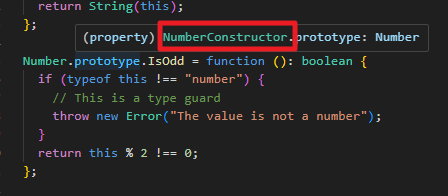
接下來我們只要把 StringConstructor 介面加入 IsNullOrEmpty 函式即可。效果就會完全跟C#一樣。
export {};

declare global {
  interface StringConstructor {
    IsNullOrEmpty(value: string | undefined | null): boolean;
  }
}

String.IsNullOrEmpty = function (value: string | undefined | null): boolean {
  return value === null || value === undefined || value === "";
};

const a: number = 2;
console.log(String.IsNullOrEmpty(a.ToString()) ? "Empty" : "Not Empty"); // Not Empty
console.log(String.IsNullOrEmpty("") ? "Empty" : "Not Empty"); // Empty
console.log(String.IsNullOrEmpty(undefined) ? "Empty" : "Not Empty"); // Empty
結論
以上做法參考看看,有時候寫 TypeScript 真的會懷念 C# 的語法,透過這樣的方式可以讓 TypeScript 也有 C# 的語法糖效果,直接讓typescript離不開C#甜死人的語法糖 👍。
範例 : 點選我
留言