本次使用 html-qrcode 快速完成掃描工具,此套件已經把版面建立完成,所以只需要測試鏡頭有沒有進去在選項中即可。
html5-qrcode
Github : https://github.com/mebjas/html5-qrcode
使用方式
npm i html5-qrcode
程式碼
以下範例有新增聲音,使用後就會達到抓取的感覺。 聲音檔 : 點擊我
<!DOCTYPE html>
<html lang="en">
<head>
    <meta charset="UTF-8">
    <meta http-equiv="X-UA-Compatible" content="IE=edge">
    <meta name="viewport" content="width=6+359999, initial-scale=1.0">
    <title>Document</title>
    <script src="/node_modules/jquery/dist/jquery.min.js"></script>
    <script src="/node_modules/html5-qrcode/html5-qrcode.min.js"></script>
</head>
<body>
    <div id="reader" width="600px"></div>
    <div>
        <h2>Scanner Log</h2>
    </div>
    <div class="log"></div>
    <script>
    function onScanSuccess(decodedText, decodedResult) {
       // 加入聲音
        const audios = new Audio('scanner-Demo-01.mp3');
        audios.play();
        audios.stop();
        $('.log').append(
            `<div>${decodedText}</div>`
        );
    }

    function onScanFailure(error) {
        // handle scan failure, usually better to ignore and keep scanning.
        // for example:
        console.warn(`Code scan error = ${error}`);
    }

    let html5QrcodeScanner = new Html5QrcodeScanner(
    "reader",
    { fps: 30, qrbox: {width: 500, height: 500} },
    /* verbose= */ false);
    html5QrcodeScanner.render(onScanSuccess, onScanFailure);
</script>
</body>
</html>
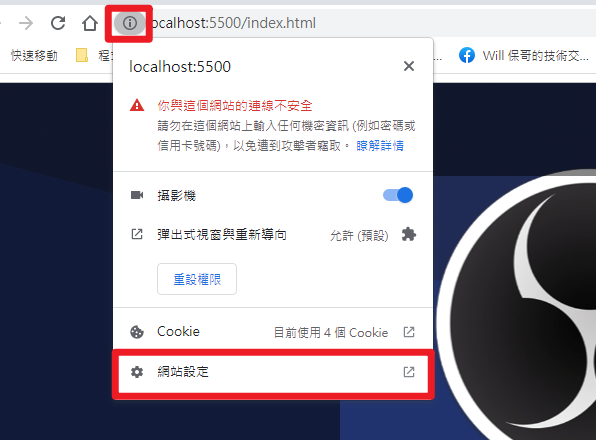
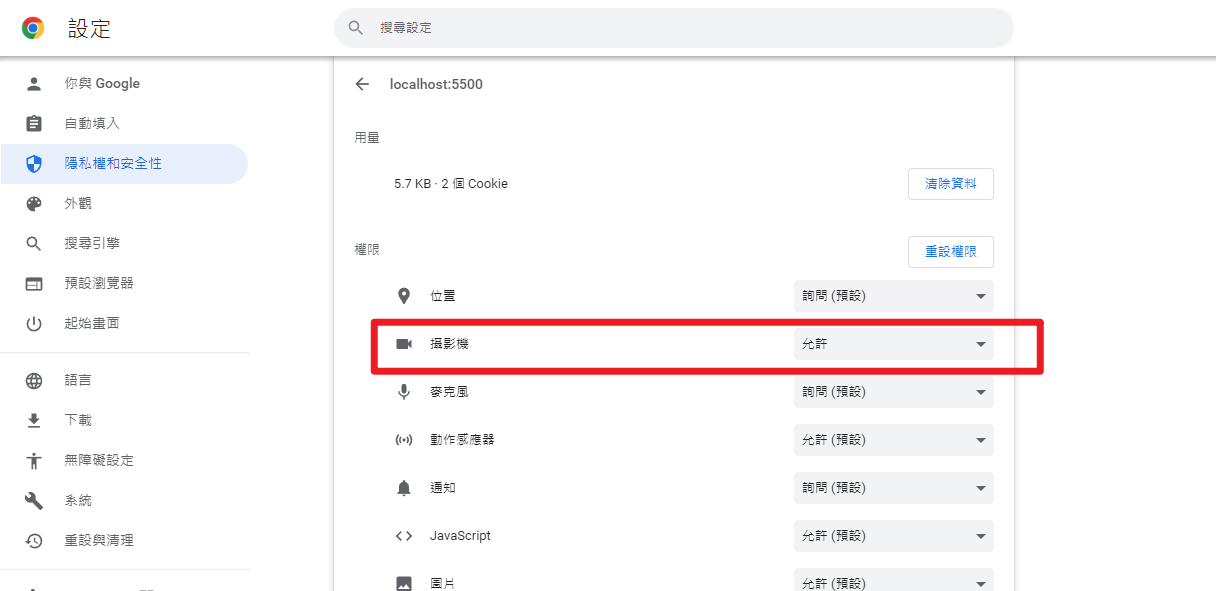
無法抓取畫面
通常預設攝影機選項是關閉的,請將這功能開啟即可。
留言