前言
近期放下手邊 side project 回歸初心繼續研究其他功能、套件,使用 discord 一段時間目標也要讓 discord 走向不同的風格,因此,利用discord webhook 製作簡易版本排程公告。
規劃
排程有很多做法可以處理,近期沒有整理一樣技術的文章,建議 C# 新手要玩排程可以考慮使用 Web Application 中 WebJob。這邊定義以下幾個排程需要用到的東西
- 內容 : 這裡使用 John Conte Blog 部落格的文章作為範例。(PS 可以使用自己的Blog)
- 時間 : 這裡思考方向要雙方要有時間,就可以不用暫存最新一筆的名稱 (待補充)。 Cron 產生器
- API/爬蟲 : 作法是否可以用API取得資料,或是使用爬蟲取得資料。
基於這幾個想法,我們就可以執行下一步驟。
製作排程公告
0. 套件
- AngleSharp : 用來爬取網頁資料
- Newtonsoft.Json : 用來處理 json 格式資料
1. 製作爬蟲
1.1 設定參數
// 建立 Browser 的配置
var config = AngleSharp.Configuration.Default
    .WithDefaultLoader()
    .WithDefaultCookies();  // 設定 Cookie

// 根據配置建立出我們的 Browser
var browser = BrowsingContext.New(config);
1.2 爬取資料
這裡就要開始針對前端 class id 基礎概念進行抓取動作,這邊使用 AngleSharp 提供的 OpenAsync 來打開網頁抓回內容。
// 這邊用的型別是 AngleSharp 提供的 AngleSharp.Dom.Url
var url = new Url("https://jontcont.github.io/");
// 使用 OpenAsync 來打開網頁抓回內容
var doc = await browser.OpenAsync(url);
var htmls = doc.QuerySelectorAll("div.recent-post-item");

foreach (var html in htmls)
{
    var link = html.QuerySelector("a")?.GetAttribute("href");
    var title = html.QuerySelector("a")?.GetAttribute("title");
    var timer = html.QuerySelector("time")?.GetAttribute("datetime");
    var text = html.QuerySelector("div.recent-post-info .content")?.TextContent.Substring(0, 50);
    DateTime dateTime;
    if (link != null)
    {
        link = "https://jontcont.github.io" + link;
    }
    if (timer != null)
    {
        string format = "yyyy-MM-ddTHH:mm:ss.fffZ"; // 爬蟲-取得的時間格式
        dateTime = DateTime.ParseExact(timer, format, CultureInfo.InvariantCulture);

        // 這邊是判斷時間是否在10小時內,如果不是就跳出迴圈
        if (dateTime < DateTime.Now.AddHours(-10))
        {
            break;
        }
        console.WriteLine($"{title} : {link}");
    }
}
2. 製作 Discord Webhook
2-1創建 Webhook 機器人
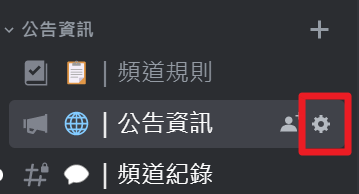
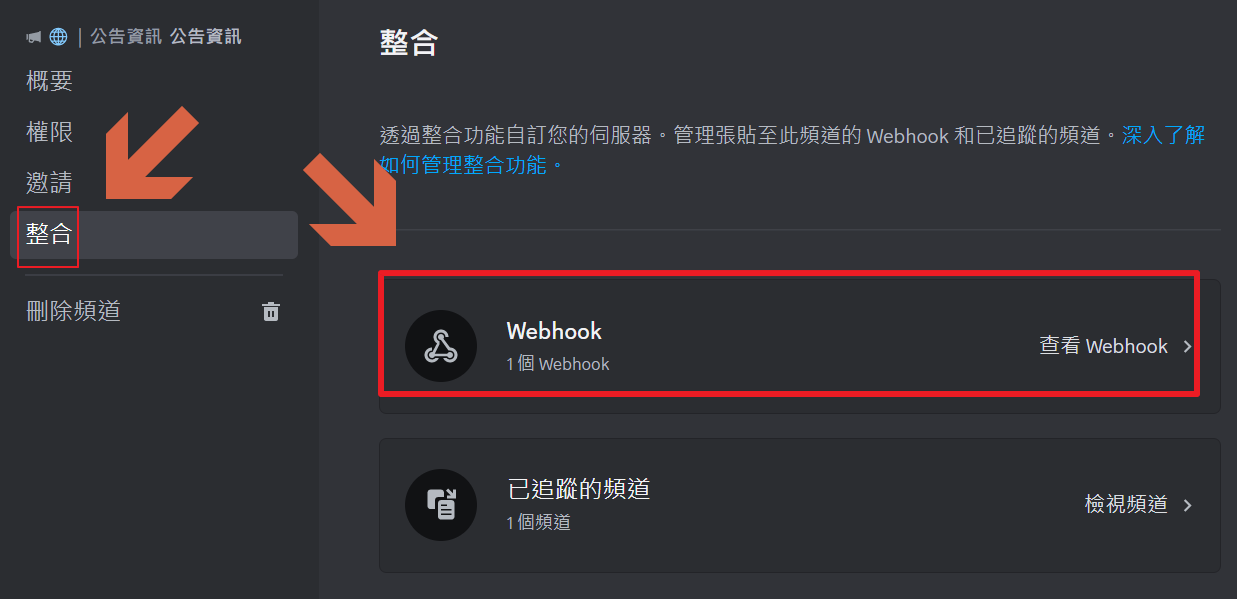
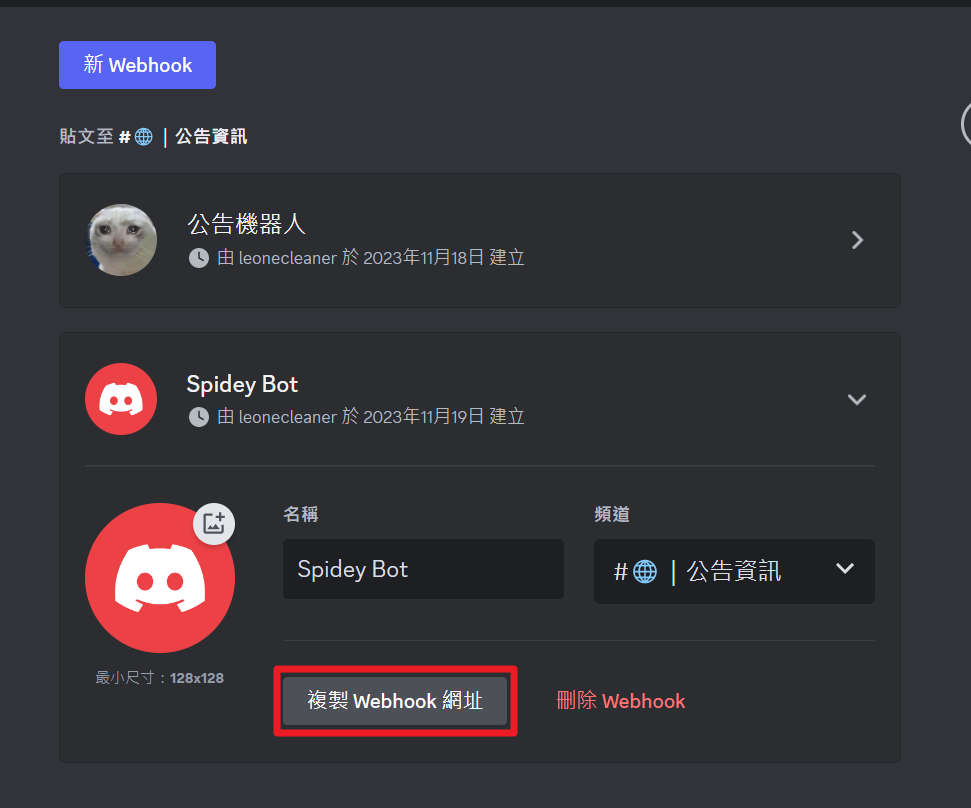
這裡操作比上一篇簡單,只需要到 Discord > 設定 > 整合 > Webhook > 新增 Webhook > 複製 Webhook URL > 儲存 。以上動作即可
2-2 撰寫 webhook 機器人
這裡我們使用 WebClient 來發送訊息,這邊要注意的是,Discord Webhook 需要使用 POST 的方式來發送訊息,並且需要設定 Content-Type 為 application/json,這樣才能正確的發送訊息。
string webhook = "https://discord.com/api/webhooks/1175246408618614845/065Y6J32diNhnm-M7cupXDdfvMTglc-xUudQGe7yJSjI8xAPFXcOa7RqPjWiDcl3SdTB";
SendMessage("Hello World", webhook);

static void SendMessage(string message, string webhook)
{
    WebClient client = new WebClient();
    client.Headers.Add("Content-Type", "application/json");
    string payload = "{\"content\": \"" + message + "\"}";
    client.UploadData(webhook, Encoding.UTF8.GetBytes(payload));
}
3. 串接爬蟲與 Discord Webhook
3-1 models 設計
class messages
{
    public string username { get; set; }
    public string avatar_url { get; set; }
    public string content { get; set; }
    public List<Embed> embeds { get; set; }
}

public class Embed
{
    public Author author { get; set; }
    public string title { get; set; }
    public string url { get; set; }
    public string description { get; set; }
    public int color { get; set; }
    public List<Field> fields { get; set; }
    public Thumbnail thumbnail { get; set; }
    public Image image { get; set; }
    public Footer footer { get; set; }
}

public class Author
{
    public string name { get; set; }
    public string url { get; set; }
    public string icon_url { get; set; }
}

public class Field
{
    public string name { get; set; }
    public string value { get; set; }
    public bool inline { get; set; }
}

public class Thumbnail
{
    public string url { get; set; }
}

public class Image
{
    public string url { get; set; }
}

public class Footer
{
    public string text { get; set; }
    public string icon_url { get; set; }
}
3-2 引入爬蟲內容
foreach (var html in htmls)
{
    var link = html.QuerySelector("a")?.GetAttribute("href");
    var title = html.QuerySelector("a")?.GetAttribute("title");
    var timer = html.QuerySelector("time")?.GetAttribute("datetime");
    var text = html.QuerySelector("div.recent-post-info .content")?.TextContent.Substring(0, 50);
    DateTime dateTime;
    if (link != null)
    {
        link = "https://jontcont.github.io" + link;
    }
    if (timer != null)
    {
        string format = "yyyy-MM-ddTHH:mm:ss.fffZ";
        dateTime = DateTime.ParseExact(timer, format, CultureInfo.InvariantCulture);
        if (dateTime < DateTime.Now.AddHours(-10))
        {
            break;
        }
        contentEmbed.Add(new Embed()
        {
            title = title,
            url = link,
            color = 0x00ff00,
            fields = new List<Field>(){
                new Field(){
                    name = "內容",
                    value = text + "...",
                    inline = false
                }
            },
        });
    }
}

if (contentEmbed.Any())
{
    SendMessage(new messages
    {
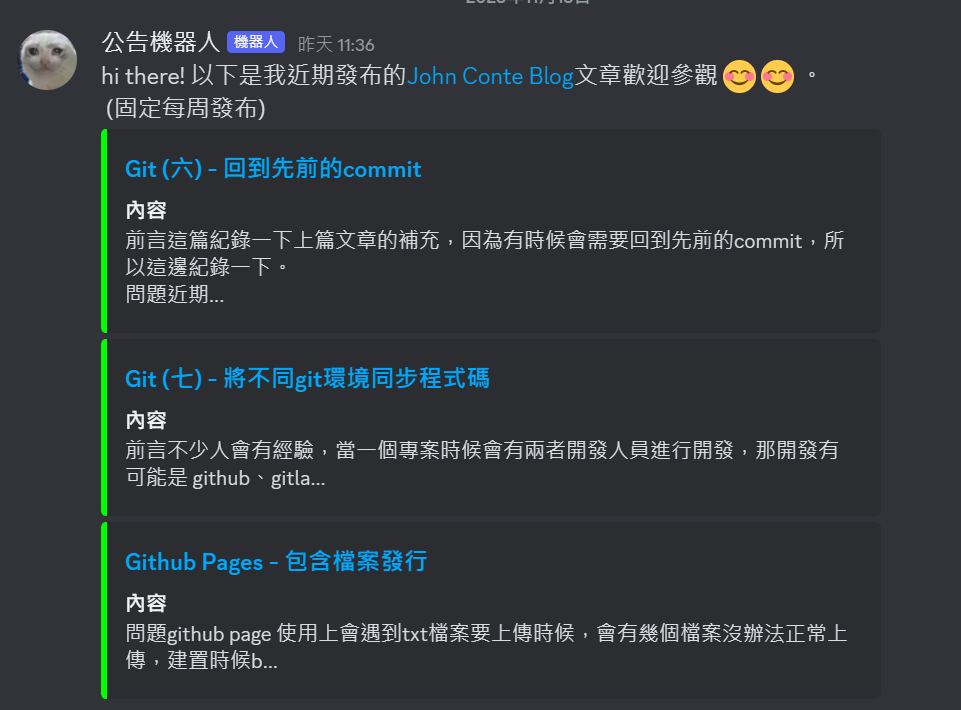
        content = $"hi there! 以下是我近期發布的[John Conte Blog](https://jontcont.github.io)文章歡迎參觀 😊 😊 。\n (固定每周發布) ",
        embeds = contentEmbed
    }, webhook);
}

static void SendMessage(messages json, string webhook)
{
    WebClient client = new WebClient();
    client.Headers.Add("Content-Type", "application/json");
    string payload = JsonConvert.SerializeObject(json);
    client.UploadData(webhook, Encoding.UTF8.GetBytes(payload));
}
4. 效果/結果
4.1 azure webjob
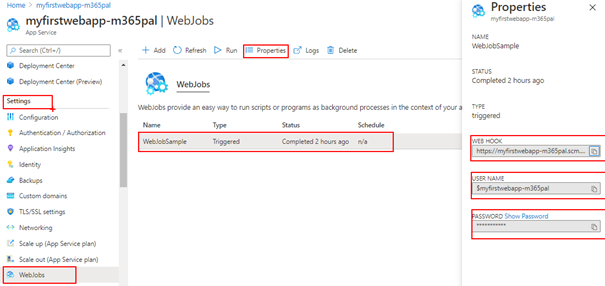
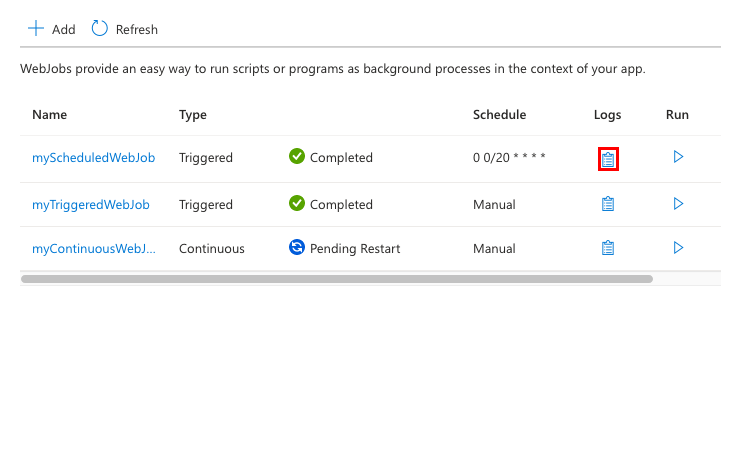
這邊需要創建 azure 雲端平台就可以使用 web app,而這裡 webjob是可以免費使用的,只要設定排程就可以執行,這邊我們就可以使用排程公告的功能。 (檔案上傳名稱務必使用英文否則上船會失敗)。
4.2 題外功能
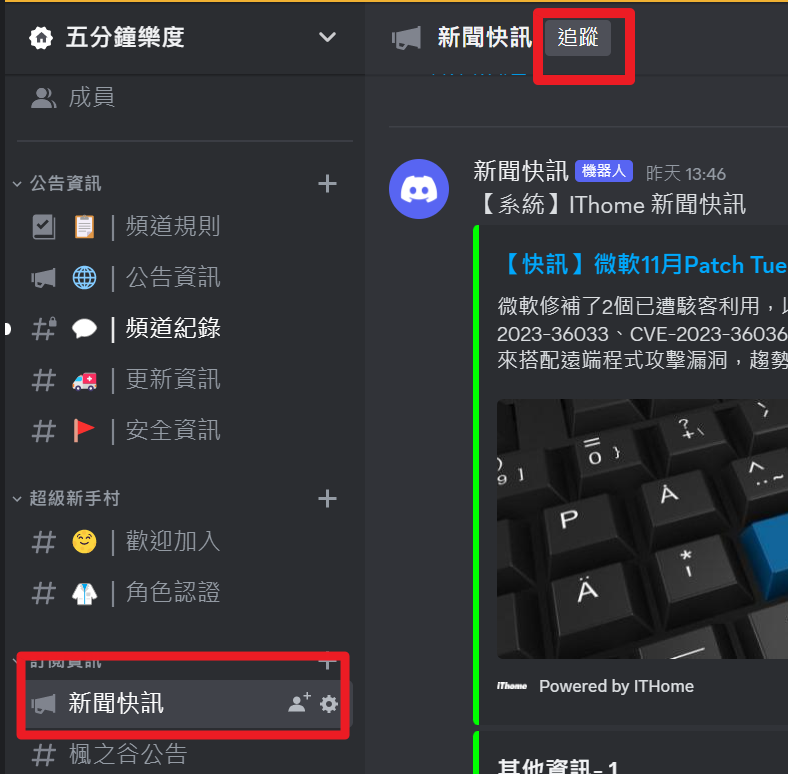
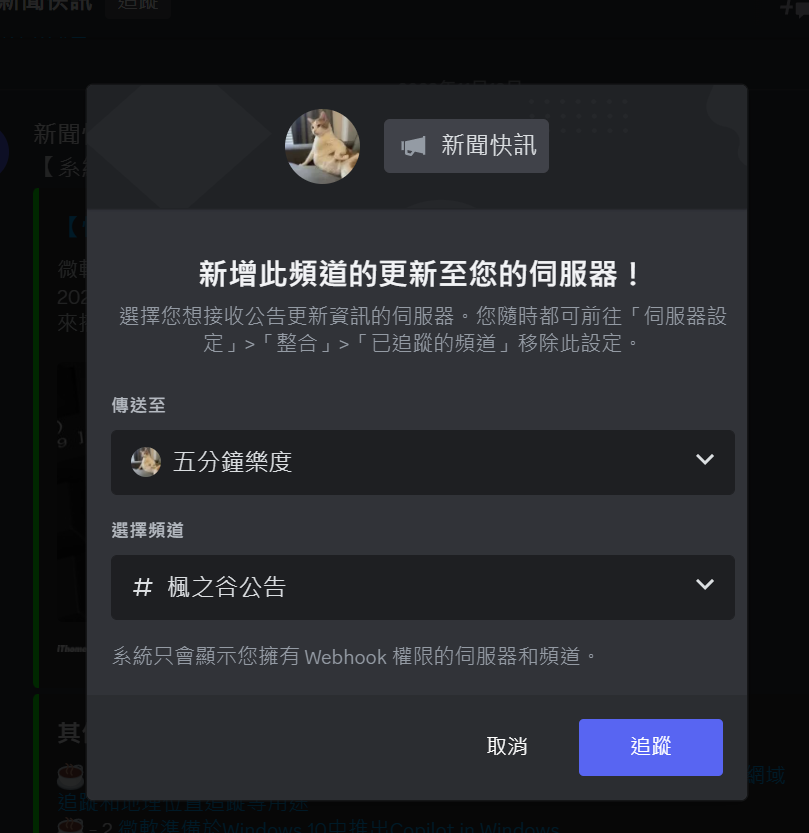
基於這個功能我特別加入 IThome 通知功能,如何看到此功能可以點下方連結,若需要訂閱請務必按照圖片動作。
4-3 訂閱/追蹤頻道
留言