前言
之前友人有提過 Redmine 有 API 功能可以直傳入給 Azure DevOps ,因此我稍微試試看如何使用 Redmine 給 Azure DevOps。
Redmine API
一、取得API Key
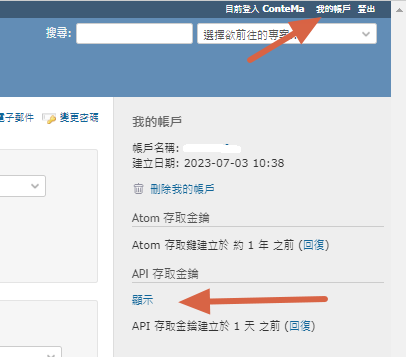
點選我的帳戶 > API 存取金鑰 > 顯示,打開後複製這組金鑰。
二、簡單實作 - 取得當前專案的Issue
2-1 安裝 NuGet 套件
dotnet add package redmine-api --version 4.6.5
引用套件
using Redmine.Net.Api;
using Redmine.Net.Api.Types;
2-2 程式碼
因為這邊專案資料比較多,所以就只抓其中幾筆資料。
// Redmine 設定
string host = "host";
string apiKey = "apiKey";
var redmineManager = new RedmineManager(host, apiKey);

foreach (var issue in issues)
{
    Console.WriteLine($"Id: {issue.Id}, Subject: {issue.Subject}");
}
Azure DevOps API
一、取得API Key
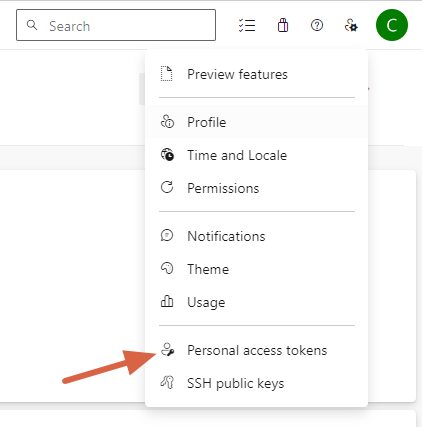
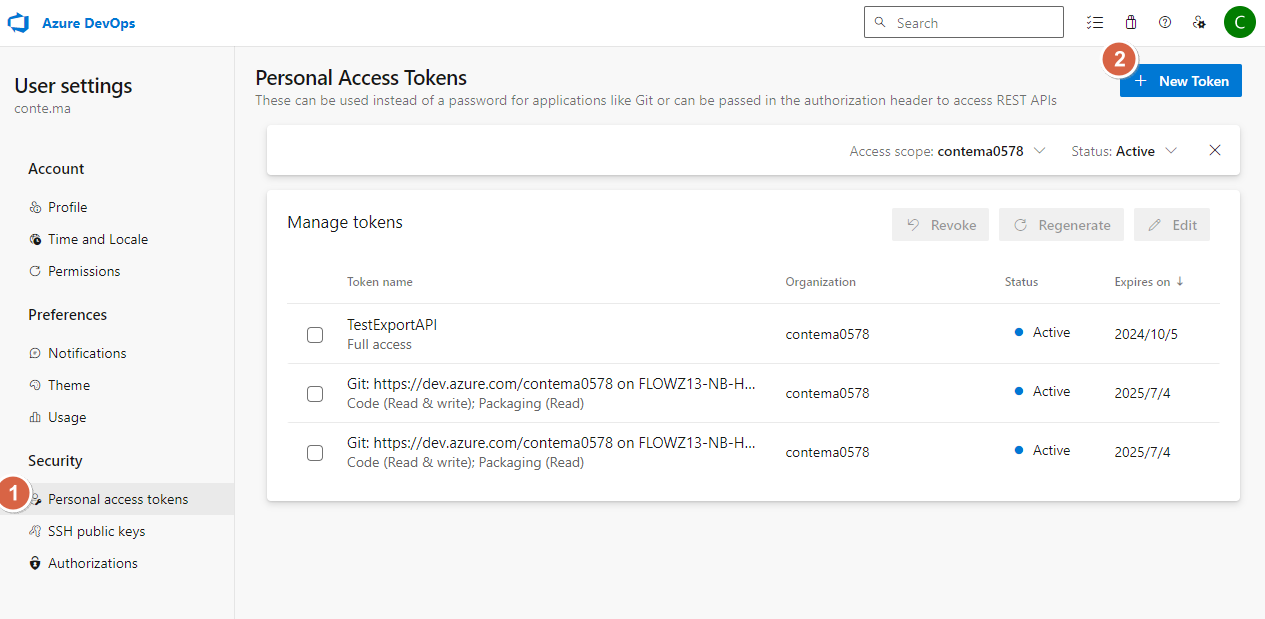
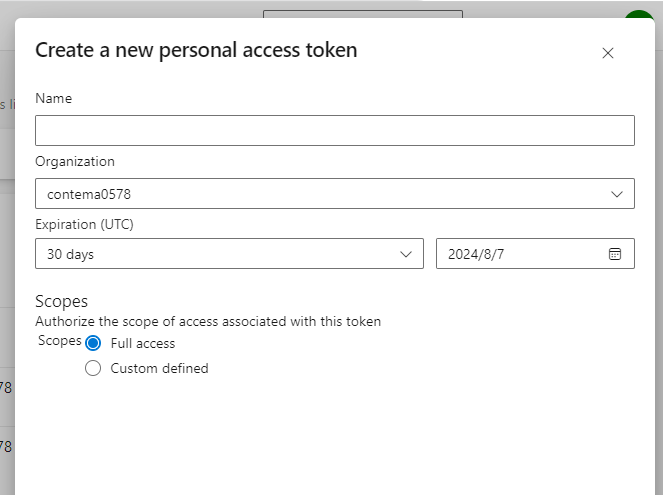
Azure 直接使用 PAT (Personal Access Token) 來當作 API Key,取得方式如下:
這邊因為我單純展示如何使用,所以PAT權限我就給最高權限。
二、簡單實作 - 建立工作項目
2-1 安裝 NuGet 套件
dotnet add package Microsoft.TeamFoundationServer.Client --version 16.153.0
引用套件
using Microsoft.VisualStudio.Services.Common;
using Microsoft.VisualStudio.Services.WebApi;
using Microsoft.TeamFoundation.WorkItemTracking.WebApi;
using Microsoft.VisualStudio.Services.WebApi.Patch.Json;
2-2 程式碼
  // Redmine 設定
string host = "host";
string apiKey = "apiKey";
var redmineManager = new RedmineManager(host, apiKey);

// Azure DevOps 設定
string azureDevOpsUrl = "azure DevOps Url";
string azureDevOpsPat = "azure DevOps Token";
VssConnection connection = new VssConnection(new Uri(azureDevOpsUrl), new VssBasicCredential(string.Empty, azureDevOpsPat));
WorkItemTrackingHttpClient workItemTrackingClient = connection.GetClient<WorkItemTrackingHttpClient>();

// 取得 Redmine 中的 issue
IList<Issue> issues = redmineManager.GetObjects<Issue>(new NameValueCollection(){
        { "status_id", "*"},
        { "project_id", "project_id"},
        { "limit", "10"}
    });

foreach (var issue in issues)
{
    // 將 Redmine issue 匯入到 Azure DevOps
    var workItem = new JsonPatchDocument(){
            new JsonPatchOperation()
            {
                Operation = Microsoft.VisualStudio.Services.WebApi.Patch.Operation.Add,
                Path = "/fields/System.Title",
                Value = $"#{issue.Id}_{issue.Subject}"
            },
            new JsonPatchOperation()
            {
                Operation = Microsoft.VisualStudio.Services.WebApi.Patch.Operation.Add,
                Path = "/fields/System.Description",
                Value = issue.Description
            },
            new JsonPatchOperation()
            {
                Operation = Microsoft.VisualStudio.Services.WebApi.Patch.Operation.Add,
                Path = "/fields/System.CreatedDate",
                Value = issue.CreatedOn
            },
            new JsonPatchOperation()
            {
                Operation = Microsoft.VisualStudio.Services.WebApi.Patch.Operation.Add,
                Path = "/fields/System.AssignedTo",
                Value = "conte.ma"
            }
        };
    workItemTrackingClient.CreateWorkItemAsync(workItem, "ProjectName", "Issue").Wait();
}
留言