一、VBA 腳本使用
1. 啟動Excel並打開VBA
首先按下Alt + F11,進入VBA編輯器,然後在左側的專案總管中,選擇這台電腦,右鍵選擇插入,選擇模組,即可進入VBA編輯器。
二、使用 SHA 加密製作
1. 加入SHA 加密Function
Public Function SHA1Hash(sIn As String, Optional bB64 As Boolean = 0) As String
    Dim oT As Object, oSHA1 As Object
    Dim TextToHash() As Byte
    Dim bytes() As Byte

    Set oT = CreateObject("System.Text.UTF8Encoding")
    Set oSHA1 = CreateObject("System.Security.Cryptography.SHA1Managed")

    TextToHash = oT.Getbytes_4(sIn)
    bytes = oSHA1.ComputeHash_2((TextToHash))

    If bB64 = True Then
       SHA1Hash = ConvToBase64String(bytes)
    Else
       SHA1Hash = ConvToHexString(bytes)
    End If

    Set oT = Nothing
    Set oSHA1 = Nothing
End Function
2. 加入巨集測試
Sub Test()
    Dim sIn As String, b64 As Boolean
    Dim sH As String
    sIn = "123456"
    b64 = True   'output base-64
    sH = SHA1Hash(sIn, b64)
    Debug.Print vbNewLine & vbNewLine & sH & vbNewLine & Len(sH) & " characters in length"
End Sub
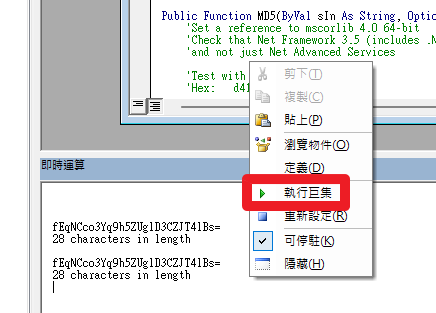
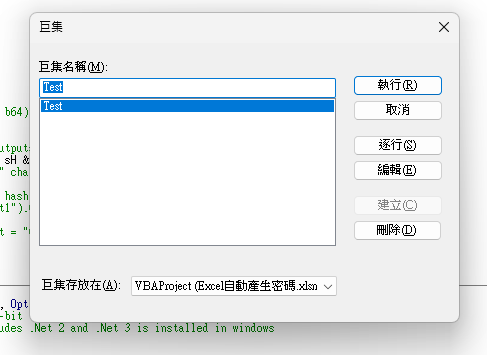
3. 加入在 Excel 中使用
=SHA1Hash(D2,C2) 加入在 Excel 中使用

留言